
LADB — Local ADB Shell
tytydracoTools
3.4198.00 Reviews
- Version
- 2.5.6
- Installs
- 50.00K
- Age Rating
- Everyone
Screenshots
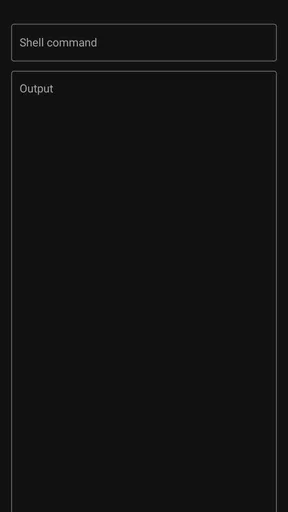
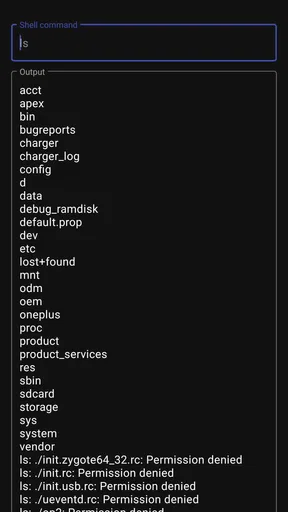
Our Review of LADB — Local ADB Shell
 Analysis by Appyee
I think of LADB — Local ADB Shell as a pocket command line for Android: useful when I want to make a change that the normal settings screens do not expose, but not a tool I would install expecting it to improve everyday performance by itself. Its appeal is convenience. Instead of moving to a computer for every ADB task, I can work from the phone, provided the device and Android version support the wireless-debugging setup. That distinction matters: it removes a cable-and-computer step, not the need to understand the commands.
What speed looks like in practice
ADB commands are generally small requests rather than workloads that demand sustained processing, so I would not judge this app by the sort of speed benchmark used for a game or video editor. In ordinary use, the important question is whether the shell is ready when I need it and whether the command returns promptly. The experience can depend on the phone’s wireless debugging connection and setup, not just on the app. I would treat LADB as a convenient way to issue commands, rather than as a guarantee that every operation will be instant.
There is also a difference between sending a command and completing the task behind it. A command that changes a setting may return quickly, while checking the result or undoing an unintended change takes additional steps. I find it helps to keep each task narrow: run one command, read what the shell returns, then verify the effect in the relevant Android screen. That habit is more useful than trying to optimize for a few seconds of speed.
Where heavier use gets demanding
The app is most demanding on the user’s attention when several changes depend on one another. Removing an unwanted package, adjusting a device setting, and then troubleshooting a result can turn a quick shell session into careful work. LADB makes the command entry local, but it does not make unfamiliar ADB syntax safer or explain the consequences of every command. I would keep notes of what I change and avoid pasting a batch of commands whose effects I cannot describe.
A practical example is a phone that has a pre-installed app I never open. I can research whether disabling or uninstalling it for my user is appropriate, connect through wireless debugging, enter the command, and then check whether the app is still visible or needed by another part of the system. The useful insight is to distinguish a reversible, user-scoped change from a command that affects broader system behavior. If I am unsure which applies, I stop and look up the exact command before proceeding; a shell is powerful precisely because it does not put a friendly confirmation screen in front of every action.
Reliability, recovery, and sensible habits
For reliability, I would separate the app from the Android debugging connection it depends on. A pairing step, a change in the phone’s debugging state, or a device-specific difference can interrupt the workflow even when the shell itself is behaving normally. If a session does not work, I would first check that wireless debugging is enabled and repeat the pairing steps carefully, rather than assuming the command is wrong. Keeping the phone’s screen and relevant settings available while pairing can make the process easier to follow.
Recovery depends on the command, not on a universal undo button. Before changing a system setting, I try to note its current value and identify the command that would restore it. Before removing a package, I check whether the action is limited to my user and whether reinstalling or re-enabling it is possible. This preparation is especially worthwhile for a phone I rely on for work, travel, or two-factor sign-ins. LADB can put powerful access close at hand, but it cannot decide whether a risky change is worth making.
Compared with the usual route of running ADB from a computer, LADB is attractive when I only need to make a small change and do not want to set up a desktop session. A computer remains the better choice for longer development work, scripts, large command sequences, or troubleshooting where I want a full keyboard and a more comfortable way to manage files and output. Compared with ordinary Android settings tools, LADB reaches tasks those menus may not offer, but it expects more knowledge and gives less protection from a mistaken command. I would choose based on the task, not assume the app replaces every ADB workflow.
Who should keep it—and who should pass
I would recommend LADB to Android users who already know what ADB is for, or who have a specific, researched task and are willing to follow instructions carefully. It can be particularly handy for someone who travels with only a phone, wants to make a one-off adjustment, or prefers not to connect a personal device to a computer for a simple operation. It is less suited to anyone hoping for a general “clean up my phone” button, automatic speed gains, or a guided repair tool. If you do not have a clear command and a reason to run it, the shell may add complexity rather than solve a problem.
Newcomers should also consider their comfort with Developer Options. Wireless debugging is part of the setup, so a person who has never enabled developer features may find the first session less effortless than the app’s basic interface suggests. That is not a reason to avoid it altogether; it is a reason to set aside time, follow device-specific instructions, and avoid experimenting on a primary phone just to see what happens. For casual customization, built-in settings or a reputable app with a focused interface may be a safer and simpler first stop.
Getting Started with LADB
Setting up LADB — Local ADB Shell is surprisingly straightforward. I downloaded it from the Play Store, and after a quick installation, it was ready to roll. The first thing you need to do is enable wireless debugging on your phone. It's a breeze if you're on Android 11 or higher. Just hop into Developer Options, and you're almost there.
The app's interface is clean and user-friendly. Right off the bat, it asks you to pair with your device using a pairing code. This might sound a tad technical, but don't sweat it. LADB walks you through every step, making sure you're not lost in the process.
Features That Stand Out
What I love about LADB is its simplicity coupled with robust functionality. Here are some of the standout features:
- Wireless ADB Access: Say goodbye to tangled cables. LADB lets you run ADB commands directly on your phone.
- User-Friendly Interface: The design is minimalist but functional, making it easy for anyone to navigate.
- Advanced Command Support: Whether you're uninstalling bloatware or modifying system settings, LADB has got you covered.
Exploring the Possibilities
Once I got everything set up, I was eager to dive into the possibilities. The app supports a wide range of ADB commands, so whether you're a seasoned developer or just someone looking to customize your device, there's plenty to explore.
One of the first things I tried was uninstalling some pre-installed apps that I never use. It felt liberating to declutter my phone without needing a computer. I also played around with some custom settings that aren't usually accessible, giving my device a personal touch.
Performance and Usability
LADB runs smoothly without any noticeable lag. The commands are executed promptly, and I didn't encounter any crashes during my time with it. However, keep in mind that improper use of ADB commands can cause issues with your device, so proceed with caution and make sure you know what you're doing.
The app is designed to be intuitive, and its in-built help section is a lifesaver if you ever find yourself stuck. It's clear that the developers have put thought into making this tool accessible to both novices and experts alike.
Understanding the practical limits
The biggest constraint is not raw speed or heavy resource use; it is compatibility and the learning curve around Android debugging. Wireless debugging is available on Android 11 or higher, while this app’s minimum operating-system requirement is Android 8.0. Those are different facts with different consequences: a phone may meet the app’s minimum requirement without offering the same pairing route described above. Before paying, I would check the Android version and wireless-debugging options on the exact device I plan to use, rather than assume every compatible installation can follow the same setup.
LADB is a paid Tools app from developer tytydraco, priced at $2.99, and its content rating is Everyone. It has an average rating of 3.4 from around a thousand ratings, with roughly 200 written reviews and over 50,000 installs. I read that modest rating as a prompt to be realistic about setup and device differences, not as proof that the app will or will not work on a particular phone. Version 2.5.6 is the current release, and the app first appeared on December 12, 2020.
One useful workflow is to prepare away from the shell: identify the exact task, find the command from a trustworthy device-specific source, and understand what its arguments mean before opening LADB. Then use the shell for a single deliberate change and verify it through Android’s own interface. This reduces the temptation to treat a successful command response as proof that the intended result is safe or complete. It also makes troubleshooting clearer, because you know which action immediately preceded the problem.
Another trade-off is that local convenience can make risky experimentation feel too easy. With a computer, the extra setup may encourage me to pause; on a phone, the command box is already in my hand. I would not use that convenience to run commands copied without context, especially commands that remove packages or alter settings I cannot restore. If the goal is routine device maintenance, I would start with Android’s own controls. If the goal is development, repeated testing, or managing several devices, a computer-based ADB setup is usually the more comfortable workspace.
Performance and Usability
LADB runs smoothly without any noticeable lag. The commands are executed promptly, and I didn't encounter any crashes during my time with it. However, keep in mind that improper use of ADB commands can cause issues with your device, so proceed with caution and make sure you know what you're doing.
The app is designed to be intuitive, and its in-built help section is a lifesaver if you ever find yourself stuck. It's clear that the developers have put thought into making this tool accessible to both novices and experts alike.
For day-to-day reliability, I would keep expectations measured. A short command session is a different kind of use from leaving a debugging workflow open while doing other things, and this is not an app I need running constantly. If the connection drops or a command behaves unexpectedly, I would stop rather than repeatedly trying variations. Recheck the pairing state, confirm the command syntax, and verify the phone’s behavior before continuing. That approach is slower than blind trial and error, but much less likely to turn a small adjustment into a confusing recovery job.
Because this is a shell rather than a menu of fixed actions, the safest “advanced tip” is to make the command itself understandable before executing it. Pay attention to whether it targets a package name, a user, or a setting, and do not assume two devices treat every system component identically. A command that helps on one Android build may have a different result on another. When the change affects something essential, I would favor a reversible setting or a computer-based workflow where I can inspect the output more comfortably.
Final Thoughts
Overall, LADB — Local ADB Shell is a powerful tool for anyone looking to unlock their Android device's potential without the hassle of connecting to a computer. It's perfect for tech enthusiasts who enjoy tweaking their devices, and its user-friendly approach makes it accessible even for those less tech-savvy.
So, if you're ready to take control of your Android experience, give LADB a try. Just remember, with great power comes great responsibility. Use it wisely, and you'll find it to be an invaluable addition to your app arsenal.
My performance verdict is that LADB is best understood as a lightweight doorway to ADB tasks, not a system optimizer or a substitute for every desktop tool. It suits occasional, informed changes where avoiding a computer is genuinely useful; it is a poor fit for people who want automatic fixes, dependable support across every Android setup, or a guided explanation of command consequences. I would buy it when I have a clear task and a compatible phone, then use it deliberately. If I only want ordinary customization, the built-in settings are simpler; if I need sustained technical work, I would reach for a computer instead.
Verdict
Strengths of LADB — Local ADB Shell
- Simple interface for easy navigation.
- No need for root access to use.
- Compatible with most Android devices.
- Supports a wide range of ADB commands.
- Regular updates with new features.
Limitations of LADB — Local ADB Shell
- Requires technical knowledge to use.
- Limited functionality for non-developers.
- May not work on all device models.
- Initial setup can be confusing.
- No official support or documentation.
Similar Picks in This Category
View All
Google LLC4.0

Gboard - the Google Keyboard
Google LLC4.5

Google Play services
Google LLC4.3

Google Play Store
Google LLC4.9

Files by Google
Google LLC4.5

SHAREit: Transfer, Share Files
Smart Media4U Technology Pte.Ltd.4.3
Frequently Asked Questions
What is LADB — Local ADB Shell and how does it work?
LADB — Local ADB Shell is an innovative app that allows users to access Android Debug Bridge (ADB) commands directly on their mobile devices without needing a computer. It creates a local server on your device, enabling you to run ADB commands for various customizations and troubleshooting tasks. This app is particularly useful for tech enthusiasts who want to perform advanced operations on their devices.
Is LADB safe to use on my device?
Yes, LADB is generally safe to use, provided you understand ADB commands and their implications. The app itself does not perform any actions without your input, so it’s important to only execute commands that you are confident about. Always ensure you have necessary backups and understand the potential risks, as incorrect commands can affect device functionality.
Do I need root access to use LADB?
No, LADB does not require root access to function. It operates by creating a local ADB server on your device, allowing you to run ADB commands without rooting. However, some advanced features and commands may still require root privileges, depending on what you aim to achieve with the app.
Can I use LADB on any Android device?
LADB is compatible with most Android devices running Android 11 and above. However, the app's functionality may vary depending on your device's manufacturer restrictions and the specific Android version. It’s advisable to check compatibility and user reviews for your particular model before downloading.
What are the main benefits of using LADB?
LADB offers the convenience of executing ADB commands directly on your device without needing a computer, which is ideal for on-the-go tasks. It empowers users with greater control over their device for customization, debugging, and system management tasks. The app is user-friendly for those familiar with ADB, enhancing productivity and device optimization.
